
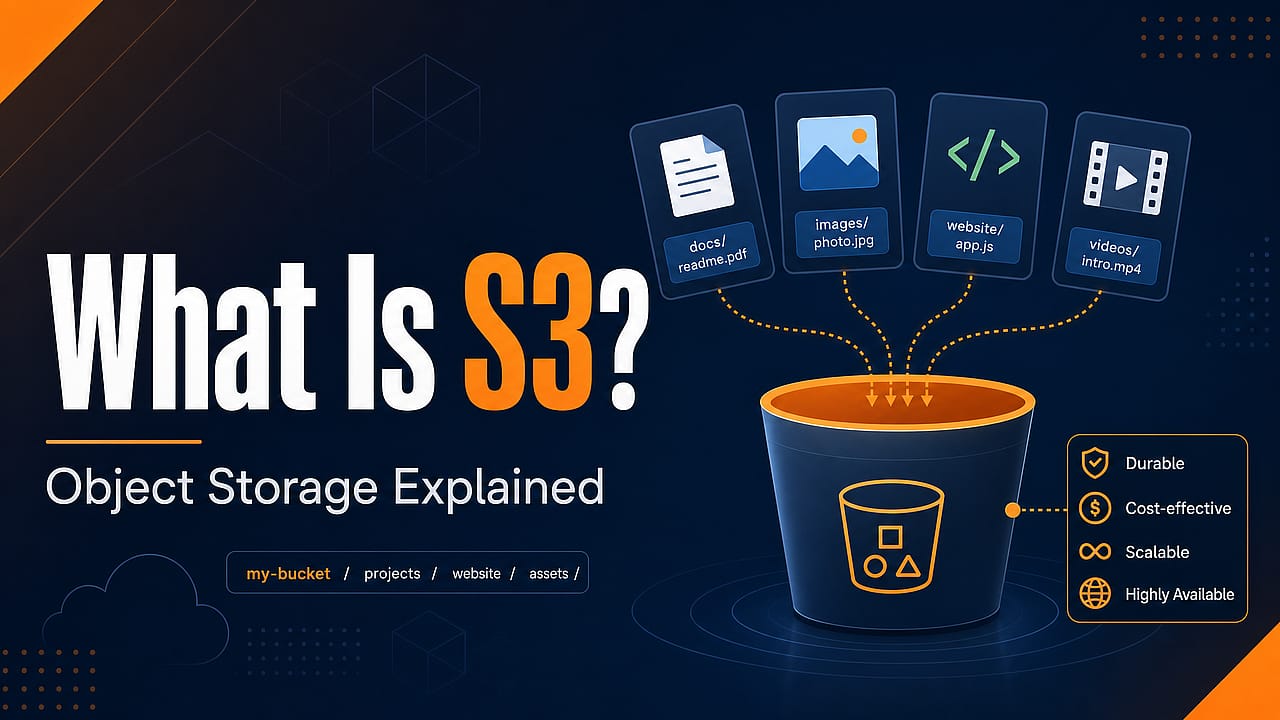
If you're building web apps, sooner or later you run into this question:
Where should uploaded files go?
Profile pictures, PDFs, videos, generated reports, backups, log files, static assets - all that data has to live somewhere.
You could store it on your server's hard drive. But that usually becomes a problem quickly: What happens if you deploy a new server? What if you need more storage? What if multiple servers should access the same files? What if users around the world should download those files reliably?
That's where services like Amazon S3 come in.
What Is S3?
S3 stands for Simple Storage Service.
It's a cloud storage service provided by AWS that lets you store and retrieve files - or more precisely: objects - over the internet.
AWS describes S3 as object storage. That means it's built for storing unstructured data like images, videos, documents, archives, backups, logs or generated files.
So instead of thinking about folders on your server, you should think about this:
- You create a bucket
- You upload objects into that bucket
- Every object has a key - a name / path-like identifier
- Every object can also have metadata
- Your application can upload, download, list or delete objects via APIs
In other words: S3 gives your application a place where files can live independently of your web server.
Buckets, Objects & Keys
The three most important S3 terms are bucket, object and key.
A bucket is a container for objects. You can think of it as the top-level storage area for a project or part of a project.
An object is the actual stored data plus metadata. For example, an uploaded profile picture, a PDF invoice, a video file or a backup archive.
A key is the unique name of an object inside a bucket.
For example:
user-uploads/avatars/max.png
invoices/2026/07/invoice-123.pdf
backups/database-backup-2026-07-06.sql.gz
Those keys look like file paths.
But technically, S3 is not a traditional file system with real folders. The slash characters are part of the object key. Tools and dashboards often display them as folders because that makes it easier for humans to navigate, but the core concept is still: bucket + object key.
What Can You Store In S3?
Pretty much any file-like data.
Common examples are:
- Images uploaded by users
- Videos or audio files
- PDFs and generated reports
- Static website assets
- Backups and archives
- Log files
- Data exports
- Files that should be processed later by background jobs
That's why S3 is so common in web applications.
Your database stores the structured app data - users, posts, orders, permissions etc. - and S3 stores the files connected to that data.
For example, your database might store this:
postId: 123
imageKey: "posts/123/header-image.webp"
And the actual image file lives in S3.
That split is very common: metadata and relationships in the database, binary files in object storage.
Why Not Store Files On The Server?
For tiny demos, storing files on the server can be fine.
But for real apps, it has downsides:
- Deployments may replace or reset the server file system
- Multiple servers don't automatically share the same local files
- Storage space is limited by the server you run
- Backups and durability become your responsibility
- Serving many large files can put unnecessary load on your app server
S3 solves these problems by moving file storage into a managed service.
You upload an object and let the storage provider handle the underlying infrastructure, replication, scaling and availability concerns.
That doesn't mean you never have to think about security, cost or architecture. But it does mean you don't have to build and operate your own file storage system.
How Do You Access S3?
You typically access S3 through APIs.
That can happen via:
- The AWS dashboard
- The AWS CLI
- AWS SDKs
- Tools that support the S3 API
- Direct HTTP requests in some scenarios
Your backend can upload files, generate download URLs, list objects, delete old files and more.
For browser-based apps, a common pattern is this:
- The user wants to upload a file
- Your frontend asks your backend for permission
- Your backend creates a temporary presigned URL
- The browser uploads the file directly to S3 using that URL
- Your app stores the object key in the database
That way, large file uploads don't have to go through your app server.
Note: This is just one possible architecture. You can also upload files through your backend first. But direct uploads via presigned URLs are a very common pattern for modern web apps.
Public And Private Files
Objects in S3 are not automatically public.
That's important.
You decide who may access a bucket or object via permissions, policies and temporary URLs.
For example, you might have:
- Public images for a marketing website
- Private invoices that only the owner may download
- Upload URLs that expire after a few minutes
- Internal backups that should never be accessible from the browser
So S3 is not just "put files online and everyone can access them".
It's a storage service where access rules matter.
What S3 Is Not
S3 is useful - but it's also easy to use the wrong mental model.
S3 Is Not A Database
You don't use S3 for relational queries, joins, transactions or frequently changing small records.
If you want to ask questions like "give me all orders by this user from last month", use a database.
Use S3 for the files connected to those records.
S3 Is Not A Normal File System
S3 keys can look like paths, but S3 is not the same as a hard drive mounted into your application.
You normally work with whole objects: upload, download, list, delete, replace.
That's perfect for many web app files. It's not the same as constantly editing tiny parts of a file like you might on a local disk.
S3 Is Not A CDN
S3 stores files.
A CDN distributes and caches files closer to users around the world.
In many real projects, S3 is used as the storage origin and a CDN such as Amazon CloudFront sits in front of it.
That way, S3 keeps the original files and the CDN makes delivery faster for users.
S3-Compatible Alternatives
Even though S3 is an AWS service, the S3 API became extremely popular.
Because of that, many other storage providers offer S3-compatible object storage.
That means you can often use the same libraries, tools or SDKs you would use with AWS S3, but point them at another provider by changing the endpoint and credentials.
A popular example is Cloudflare R2.
R2 is Cloudflare's object storage service and it supports the S3 API. So if a framework, runtime or library knows how to talk to S3, it can often also talk to R2.
Other providers offer similar ideas too, and you can even run S3-compatible storage yourself with tools like MinIO.
But "S3-compatible" does not always mean "identical to AWS S3 in every detail".
Always check the provider's docs if you rely on advanced features.
For many common web app use cases though - uploading, downloading and serving files - S3-compatible storage can be a very practical alternative.
When Should You Use S3?
Use S3 or an S3-compatible service when your application needs to store file-like data in a durable, scalable place outside of your app server.
Typical examples:
- User-uploaded images
- Product photos
- Generated PDFs
- Export files
- Backups
- Static assets
- Video or audio files
- Files that need temporary download links
A very common architecture looks like this:
- Database: stores users, posts, orders and file references
- S3 / R2: stores the actual files
- Backend: controls permissions and creates upload / download URLs
- CDN: optionally makes public files faster to load globally
That's the big picture.
S3 is not magic. It's also not a database replacement.
But it solves one very important problem extremely well: storing and retrieving files for applications without managing your own storage infrastructure.
Learn More
If you want to dive deeper into the official docs, these are good starting points: